
Local → Git → Staging: What the Workflow Must Prove
Our deployment records show how a staging-looking hostname and an outdated description can turn an ordinary push into an unexpected production change.
- Evidence
- Documentary case study
- Status
- Reference
- Audience
- builder
The problem was the destination.
A developer can review every line of a change and still release it to the wrong place. EKG Marketing’s repository documentation records a production hostname mistaken for staging. The hostname contained a staging-like phrase; its actual role was the production installation’s default address.
The same document explains that the repository’s configured branch deploys to production. The separate staging site is not automatically a step in that path. These are documented operating facts, not a new live hosting inspection.
The workflow we want.
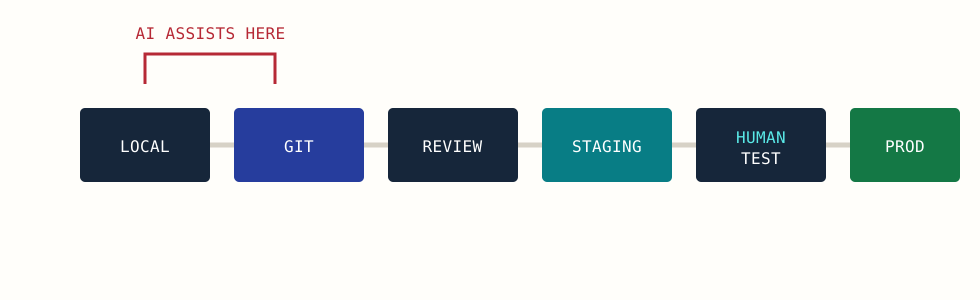
Local work gives you a reversible place to experiment. Git records the change. Review checks scope. Staging exercises the visitor and editor journeys. A person approves the release to the named production destination.
The gap between a diagram and configuration.
| Assumption | What the records showed | Practical consequence |
|---|---|---|
| A staging-looking hostname is staging. | A production hostname had been mistaken for staging. | Identify the environment through its role and configuration. |
| Pushing automatically tests staging first. | The configured repository targeted production. | Treat that push as a publication action. |
| The README describes the entire deployment scope. | Its plugin count lagged the allowlist. | Compare the description with the files that can actually move. |
The remedy is not to add a more emphatic warning to every file. Put one accurate release procedure where the next person will encounter it, and make the destination observable before the action.
A release record you can review.
Change: fix the mobile submenu interaction
Source revision: record the actual commit
Files included: record the changed files and deployed scope
Staging destination: confirm the actual environment
Checks: keyboard, pointer, narrow screen, existing menus
Rollback: name the prior artifact and affected data
Production destination: confirm separately
Approval: record the responsible person and time
Keep the record short enough that someone will use it. It should answer what changes, where it goes and how the result will be checked.
Where AI belongs.
AI can help inspect a diff, suggest a check and prepare release notes. It should not infer that a production push is authorized because a local build passed. The destination and approval are facts supplied by the project’s operating process.
A code rollback also has limits. Restoring an earlier theme file will not necessarily restore a database change or an external side effect. Match the recovery plan to the actual change.
Adapt this pattern.
A student can apply the same sequence to a personal site with a preview and a public version. A community organization can use it for a volunteer handoff. The important habit is to name the environment and the responsible person before release.
Read the Git guide for the boundary between code history and the rest of the website.
Sources and further reading
Primary documentation checked September 14, 2026. Product behavior and terms can change; follow the source for current details.
KEEP EXPLORING